Instagram Story Dimensions in 2026: Every Aspect Ratio, Crop and Spec That Actually Matters
Instagram Stories are 1080x1920 (9:16) but that's only half the truth. Here's the full 2026 spec sheet: every aspect ratio, why 4:5 still crops on certain phones, durations, file limits, and what the algorithm punishes.
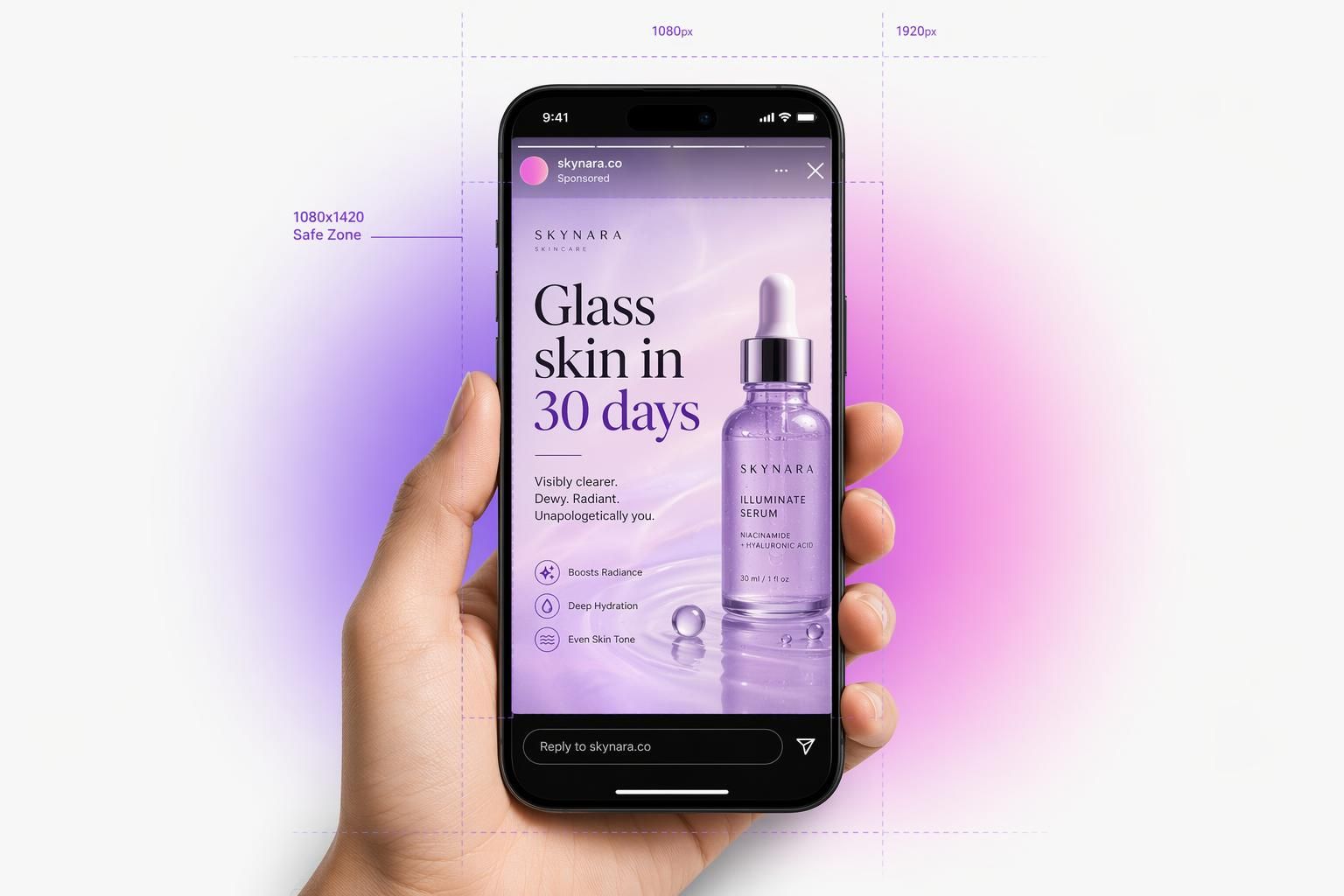
Instagram Story size is 1080x1920 pixels at 9:16, with a 250-pixel safe zone top and bottom. That's the one-liner. The rest of this post is what you actually need if you're paying for Story Ads: the central safe band, the 340-pixel CTA overlay, Meta's March 2026 unified safe-zone spec, and the aspect-ratio mistakes that waste 30-50% of the screen you're paying for.
The Bottom Line: Render every Story creative at 1080x1920 (or 1440x2560 for high-density Story Ads), keep critical text and faces inside the central 1080x1420 band, and assume the bottom 340 pixels of any Story Ad will be covered by the reply bar plus the CTA button.
The TL;DR Spec Sheet
If you only need the raw numbers (formats, file limits, video length caps, per-placement dimensions), our Instagram story size and ratio specs page is the quick reference. This post goes deeper on where those pixels get covered.
| Spec | Organic Story | Story Ad |
|---|---|---|
| Resolution | 1080 x 1920 px | 1080 x 1920 (min) / 1440 x 2560 (recommended) |
| Aspect ratio | 9:16 | 9:16 |
| Min accepted | 720 x 1280 px | 720 x 1280 px (will look blurry) |
| Image format | JPG, PNG | JPG, PNG |
| Image max file | 30 MB | 30 MB |
| Video format | MP4, MOV (H.264 + AAC) | MP4, MOV (H.264 + AAC) |
| Video max file | 4 GB | 4 GB |
| Photo display time | 7 sec (15 sec with music sticker) | 6 sec default |
| Video length | 60 sec per segment | 1 to 60 sec (15 sec recommended) |
| Frame rate | 30 fps | 30 fps |
| Bitrate (1080p) | 3.5 Mbps | 3.5 Mbps |
| Top UI overlay | ~250 px (14%) | ~270 px (14%) |
| Bottom UI overlay | ~250 px | ~340 px (CTA button included) |
| Side gutter | ~40 px each | ~65 px each (6%) |
| Daily post cap | 100 stories / 24h | N/A |
| Primary text | N/A | 125 chars |
| Headline | N/A | 40 chars |
Sources: Sprout Social Social Media Image Sizes Guide, inro.social Instagram Story Size 2026, Buffer Instagram Image Size Guide 2026, Sellerpic Instagram Safe Zone Guide 2026.
Photo Story Specs (Organic)
A single Story photo renders at 1080x1920 pixels in JPG or PNG, with a hard 30 MB ceiling. By default the photo holds for 7 seconds before the next Story slides in. If you attach a music sticker, Instagram bumps that to roughly 15 seconds so the song clip can play through (source: Kapwing 2026).
Photos shot inside the Instagram camera skip auto-resize. Photos uploaded from your camera roll get re-sampled, which is what produces the auto-gradient and edge clipping.
Video Story Specs (Organic)
Story video: 1080x1920, MP4/MOV, H.264 + AAC 44.1 kHz, 30 fps, 3.5 Mbps target, 4 GB max (source: Wavegen 2026 spec). As of 2026, native uploads hold a single 60-second segment instead of four 15-second tiles (source: Kapwing, Sellerpic Story Length 2026). Re-shared Feed / external clips are still capped at a 15-second preview.
Two compression paths: in-app recordings avoid a second pass and stay clean. External uploads (camera roll, CapCut, Premiere) get re-encoded once on upload, which is when compression artifacts appear if your source bitrate was too low. The fix is exporting at 3.5 Mbps minimum so Instagram's re-encode doesn't shred the detail. Anything under 2 Mbps is going to ship visibly muddy on modern OLED phones.
Story Ad Specs
Single Image Story Ad
1080x1920 minimum, 1440x2560 recommended for Pro Max / Ultra screens. 9:16. JPG or PNG, 30 MB max. 125-char primary text, 40-char headline, URL required (source: Sprout Social Instagram Ad Sizes 2026).
The Meta 2026 update introduced the 1440x2560 recommendation specifically because Pro Max and Ultra-class phones now ship native 1290+ logical resolution screens. Uploading at 1080 still works, but the image gets upscaled at render time and edges soften.
Single Video Story Ad
Same dimensions as the image variant: 1080x1920 minimum, 1440x2560 recommended. Length range 1 to 60 seconds, but 15 seconds is the recommended ceiling for retention. 4 GB file ceiling. MP4 or MOV, H.264 + AAC.
The retention math: brands can lose roughly 20% of their audience by the second frame of a Story (source: Impact Plus). Padding past 15 seconds is mostly impression dilution unless the hook is genuinely cinematic.
Story Carousel Ad
2 to 10 cards. Each card is 1080x1920 at 9:16. Video cards 1 to 15 seconds each. Image cards 30 MB ceiling, video cards 4 GB ceiling. Same 125 char primary text, 40 char headline (source: Meta Carousel Ad Specs).
The front-load rule: only cards 1 through 3 display before the viewer has to tap "Expand Story" to see the rest. If your hook is on card 4 you might as well not have shipped card 4. Front-load the punchline and the offer.
The Safe Zone Diagram: Where Instagram's UI Will Eat Your Creative
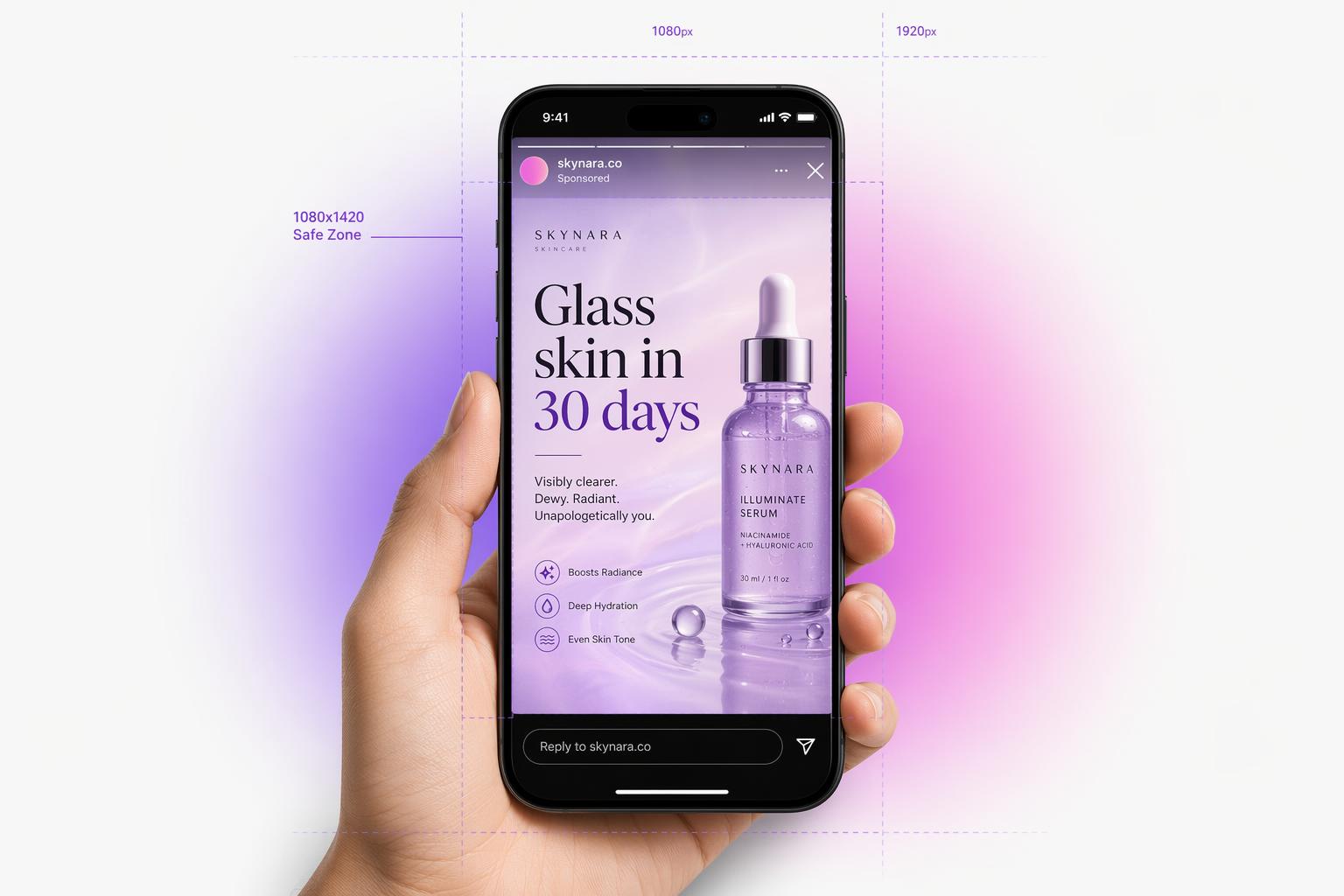
The single biggest source of cropped Story creative is misunderstanding what the UI covers. On a 1080x1920 canvas the username, profile pic, timestamp, and progress bar live in the top ~250 pixels (about 14% of the frame). On an ad the bottom ~340 pixels are eaten by the reply bar plus the CTA button (source: Sprout Social). On organic, the bottom is ~250 pixels because there's no CTA.
Meta publishes one 9:16 rule and applies it to Instagram Stories, Instagram Reels, Facebook Stories, Facebook Reels and 9:16 Feed at the same time: 14% off the top, 35% off the bottom, 6% off each side, plus a block in the bottom right corner. On 1080 x 1920 that is 269, 672, 65 and 65, leaving a 950 x 979 safe rectangle. There is no separate Stories number in any Meta source, and the 20% bottom figure that circulates is not Meta's. Draw those bands on your own creative in the safe zone checker, which also covers TikTok, Shorts, Snapchat and Pinterest.
Target CTR 0.33-0.54%
Average Story Ad CTR sits between 0.33% and 0.54% in 2026 (source: Madgicx). Anything under 0.3% almost always means the creative is letterboxed, off-spec, or has a CTA buried in the bottom 340-pixel band. Re-render at 9:16 and reposition the CTA before assuming the message itself is wrong.
Stories CPM averages $7.25 (14% cheaper than Feed)
Story placements run roughly 14% cheaper on a CPM basis than Feed (source: Madgicx). That delta is real money on a $50k/month budget. Design Story-native to capture it. If you're running letterboxed Feed assets in Stories, the cost advantage evaporates because performance tanks.
The 4:5 Trap: Why Feed-Native Creative Dies in Stories
The default portrait aspect for Instagram Feed is 4:5 (1080x1350). The default for Story is 9:16 (1080x1920). Repurpose your Feed asset into a Story slot and you ship a letterboxed creative that wastes 15-20% of screen height. Drop a 1:1 square in there and you waste closer to 30%. A 16:9 landscape video wastes 40-50% (source: Cometly).
If you ship 4:5 in a Story slot at the 2026 Madgicx $7.25 CPM benchmark (source: Madgicx 2026), 15-20% of every impression is letterbox bars instead of your creative. Re-render before scaling spend.
Already have the asset? Reframe it to 9:16 instead of re-shooting.
If your square or landscape ad already converts in Feed, you don't need to start over for Stories. Drop it into the Meta Ad Resizer and it extends the background to fill 1080x1920 instead of cropping or stretching, then rescales the subject, headline, and CTA to fit the taller frame. It's free to try, and it kills the letterbox bars without touching the creative that already works.
Generate Story-native ads at 1080x1920 in 30 seconds.
AdMakeAI's Create Ad outputs Story creatives at 1080x1920 natively, with safe-zone-aware framing so faces, text, and CTAs never land under Instagram's UI. Free credits, no card.
Common Story Errors (Do-This-Not-That)
Text in the top 250 px
The username and timestamp overlap your headline. Move text into the central safe band (250-1670 px from top).
CTA in the bottom 340 px (ads)
The reply bar plus the auto CTA button cover anything below 1580 px. Reposition the CTA sticker manually.
Faces at frame edges
20:9 ultra-tall devices crop horizontally. Keep faces inside the 65-pixel side gutter on each edge.
Logo in the top-right corner
The "more options" (three-dot) icon and close X sit there. Move the logo to top-left below the username strip, or center it.
Link sticker in the bottom 250 px
The reply bar overlay makes the tap target dead. Place link stickers in the 1200-1600 px thumb-friendly zone (source: Sellerpic).
4:5 or 1:1 export from Canva
Letterboxed with a gradient. Use Canva's 1080x1920 Story preset, not the default Feed preset.
Leaving the default CTA sticker placement
The 2026 editor lets you drag the auto-CTA sticker out of the bottom 340-pixel band. Do it; the default placement covers any headline that crosses into that zone (source: Sellerpic).
Frequently Asked Questions
What's the safe zone for an Instagram Story?
Keep critical content inside the central 1080x1420 band. The top 250 px and bottom 250 px get covered by Instagram's UI on organic Stories. Ads use 340 px at the bottom because of the CTA button (source: Sellerpic).
How long can an Instagram Story video be?
60 seconds per continuous segment for native uploads as of 2026. Videos shared from Feed or external apps still cap at a 15-second preview. Story Ad videos can run 1 to 60 seconds, but retention data shows hard drops past 15 seconds (source: Kapwing).
How long does an Instagram Story photo display?
7 seconds by default. Adding a music sticker stretches it to roughly 15 seconds so the song clip can finish playing.
Why does Instagram crop my Story?
Almost always because the upload isn't 9:16. Instagram auto-resamples non-9:16 to fit, which is when text at the edges gets clipped and the auto-color gradient appears. Re-render at 1080x1920 before uploading.
Ship Story Ads at the Right Spec the First Time
Generate 9:16 Story creative natively at 1080x1920 with safe-zone framing already applied. Free credits, no card, ~30 seconds per ad.
Free credits included. Generate Story-native ads in ~30 seconds.
Related Resources
Facebook Ad Image Sizes 2026
The full image spec sheet for every Facebook placement.
Facebook Video Ad Sizes 2026
Resolution, length, bitrate, and codec specs for every Facebook video ad placement.
Higher CTR on Facebook Ads in 2026
Spec compliance is only step one. The performance habits that push CTR past 0.5%.
Safe zone checker
Draw Meta's, TikTok's, Shorts' and Snapchat's official safe zones on your own creative and download the PNG overlays.
Instagram ad mockup generator
Your 1080 x 1920 creative inside the real Story and Reels frame, with the caption fold and CTA pill drawn in place.
The Creative Volume Wall
Why brands shipping 50 ads a week beat brands shipping 5. The math behind real creative volume.
Make your next ad from what already runs
Research what competitors are running, then generate your own on-brand ads in minutes.