How to Install the Meta Pixel in React (2026 Guide for Vite + CRA)
Install the Meta Pixel in any React SPA without extra npm packages: the base snippet, React Router pageview tracking, the StrictMode double-fire fix, TypeScript types, and verification with Test Events.

The Meta Pixel assumes every page view is a full document load. A React SPA loads one document, once, and then React Router swaps components in place for the rest of the session. Paste the standard snippet into a Vite or CRA app and it does exactly what it says: it fires one PageView when index.html loads, then goes silent while your user visits ten more routes. Meta sees a site where nobody browses past the landing page, and every audience built on page visits is missing most of its members.
The fix takes about two minutes once you know where it goes. There is an npm package for this, react-facebook-pixel, but it has been unmaintained for years and wraps a script you can load yourself in about 30 lines, with TypeScript types. This guide does the manual setup for Vite and Create React App.
Bottom line: three steps. Load the base pixel code once at startup, fire a PageView on every route change with a tiny component inside your router, and verify the result in Events Manager's Test events tab. Everything else in this post is detail around those three moves.
Get your Pixel ID
Open Events Manager at business.facebook.com/events_manager2, click Data sources in the left sidebar, and select your pixel. The ID is the 15-16 digit number under the pixel name. Copy it. If you do not have a pixel yet, the same screen lets you create one.
Put the ID in an env var. The ID is not a secret, it ships in your page source either way, but the env var keeps it out of your code and lets staging point at a different pixel than production.
.env.local
# .env.local (Vite)
VITE_META_PIXEL_ID=1234567890123456

# .env (Create React App)
REACT_APP_META_PIXEL_ID=1234567890123456
In code, Vite exposes it as import.meta.env.VITE_META_PIXEL_ID and CRA as process.env.REACT_APP_META_PIXEL_ID. With the ID in hand you have two install options.
Option A: paste the snippet in index.html
The fastest path. Vite serves index.html from the project root, CRA keeps it at public/index.html. Paste Meta's stock snippet right before the closing head tag and replace YOUR_PIXEL_ID in both places.
index.html
<!-- Meta Pixel Code -->
<script>
  !function(f,b,e,v,n,t,s)
  {if(f.fbq)return;n=f.fbq=function(){n.callMethod?
  n.callMethod.apply(n,arguments):n.queue.push(arguments)};
  if(!f._fbq)f._fbq=n;n.push=n;n.loaded=!0;n.version='2.0';
  n.queue=[];t=b.createElement(e);t.async=!0;
  t.src=v;s=b.getElementsByTagName(e)[0];
  s.parentNode.insertBefore(t,s)}(window, document,'script',
  'https://connect.facebook.net/en_US/fbevents.js');
  fbq('init', 'YOUR_PIXEL_ID');
  fbq('track', 'PageView');
</script>
<noscript><img height="1" width="1" style="display:none"
  src="https://www.facebook.com/tr?id=YOUR_PIXEL_ID&ev=PageView&noscript=1"
/></noscript>
<!-- End Meta Pixel Code -->
This works, and for a marketing site with no build pipeline opinions it is fine. Two downsides for an app. The pixel ID is hardcoded, so staging and production share a dataset unless you template the HTML. And the snippet fires in development, so every npm run dev session sends localhost PageViews into the same data your ad delivery optimizes against. Demo your own checkout a few times a day and you become your own most engaged visitor. Option B fixes both.
Option B: a typed init module (recommended)
Same bootstrap Meta ships, rewritten as a module that reads the ID from your env and gives you a typed track helper for later.
src/lib/meta-pixel.ts
const PIXEL_ID = import.meta.env.VITE_META_PIXEL_ID as string;

declare global {
  interface Window {
    fbq?: (...args: unknown[]) => void;
    _fbq?: unknown;
  }
}

export function initMetaPixel() {
  if (!PIXEL_ID || window.fbq) return;

  const n: any = (window.fbq = function () {
    n.callMethod ? n.callMethod.apply(n, arguments) : n.queue.push(arguments);
  });
  if (!window._fbq) window._fbq = n;
  n.push = n;
  n.loaded = true;
  n.version = "2.0";
  n.queue = [];

  const script = document.createElement("script");
  script.async = true;
  script.src = "https://connect.facebook.net/en_US/fbevents.js";
  document.head.appendChild(script);

  window.fbq("init", PIXEL_ID);
  window.fbq("track", "PageView");
}

export function track(name: string, data?: Record<string, unknown>) {
  window.fbq?.("track", name, data);
}
Call it once at startup, before your root render, gated to production builds:
src/main.tsx
import { initMetaPixel } from "./lib/meta-pixel";

if (import.meta.env.PROD) {
  initMetaPixel();
}

createRoot(document.getElementById("root")!).render(<App />);
Two details carry the weight here. The PROD gate means development sessions never load fbevents.js at all, which keeps your localhost clicks out of your custom audiences and your conversion counts. And the window.fbq guard at the top makes init idempotent: hot reloads or an accidental second import cannot inject the script twice. On CRA, swap the env read for process.env.REACT_APP_META_PIXEL_ID and gate on process.env.NODE_ENV === "production". Everything else is identical.
Track route changes with React Router
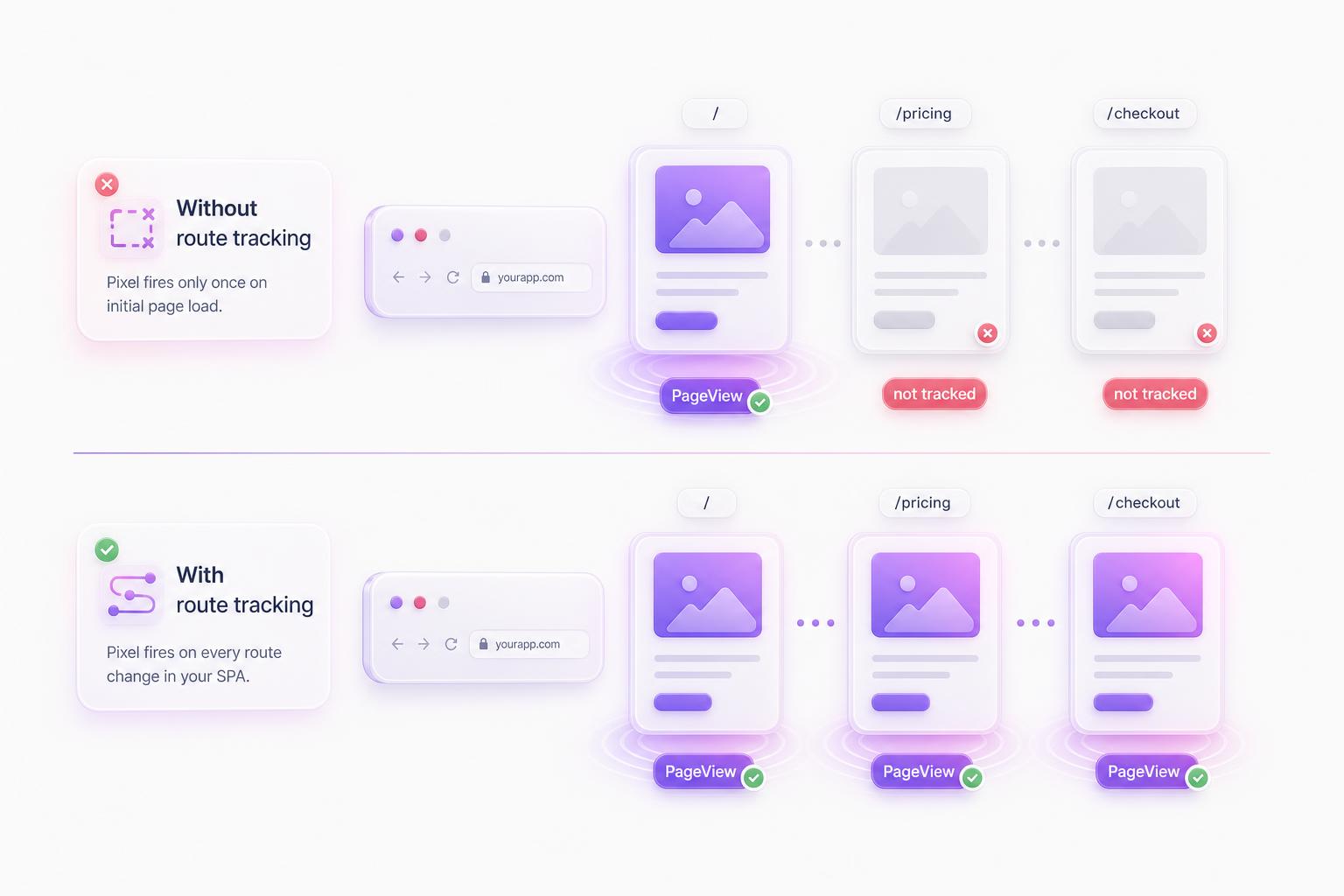
Everything so far reproduces what the plain snippet does: one PageView when the document loads. Now the part that makes it work in a SPA. React Router navigations never reload the document, so fbevents.js never notices them. You have to tell it. One small component, mounted once, handles every navigation in the app (works on React Router v6 and v7):
src/components/MetaPixelPageView.tsx
import { useEffect, useRef } from "react";
import { useLocation } from "react-router-dom";

export function MetaPixelPageView() {
  const location = useLocation();
  const firstLoad = useRef(true);

  useEffect(() => {
    if (firstLoad.current) {
      firstLoad.current = false; // init already sent the first PageView
      return;
    }
    window.fbq?.("track", "PageView");
  }, [location.pathname, location.search]);

  return null;
}
The firstLoad ref is doing real work. initMetaPixel already sent a PageView for the initial load, so the effect skips its first run. Remove the ref and every landing gets counted twice. Watching location.search as well as pathname means a move from /pricing to /pricing?plan=pro registers as a navigation, which is usually what you want.
Mount it once inside your router:
src/App.tsx
<BrowserRouter>
  <MetaPixelPageView />
  {/* your routes */}
</BrowserRouter>
If you are on TanStack Router instead, the idea is the same: subscribe to the router's navigation events and call window.fbq from the subscriber.
The StrictMode double-fire
At some point you will open the network tab in development and see two PageView requests where you expected one. That is StrictMode. In dev, React deliberately mounts, unmounts, and remounts components to surface effects that are not cleanup-safe, so your effects run twice and anything they fire shows up doubled.
This is dev only. Production builds mount once and fire once. So the rule is simple: never judge duplicate events from npm run dev. Build for production and preview it locally, or watch Test Events against the deployed site. If events still arrive doubled there, you have a real problem, and it is almost always the one covered in the common problems section below.
Track events that matter
PageView tells Meta someone showed up. The events that actually make ads cheaper are the ones tied to intent, because they are what delivery optimizes toward and what audiences get built from. The track helper from the init module covers all of them:
anywhere in your app
import { track } from "./lib/meta-pixel";

// Signup CTA
<button onClick={() => track("Lead")}>Start free trial</button>

// Order confirmation, after checkout succeeds
track("Purchase", { value: 49, currency: "USD" });

// Pricing page mount
useEffect(() => {
  track("ViewContent");
}, []);
Because track uses optional chaining on window.fbq, these calls are safe in development where the pixel never loaded. They do nothing instead of throwing.
Use Meta's standard event names with exact spelling and casing. Delivery optimization and lookalike seeding only work against events Meta recognizes:
| Funnel step | Standard event |
|---|---|
| Viewed a product or key page | ViewContent |
| Added an item to cart | AddToCart |
| Started checkout | InitiateCheckout |
| Submitted a signup or contact form | Lead |
| Finished creating an account | CompleteRegistration |
| Paid | Purchase |
Verify it works
Two tools, both free. First, the Meta Pixel Helper Chrome extension. Load your deployed site and the extension icon shows which pixel it found; click it to see each event as it fires (here is what each warning means). Second, Events Manager itself: select your pixel and open the Test events tab. Enter your site URL, browse in the window it opens, and events appear in the stream within seconds. Test events is real time. The aggregate charts on the overview lag by roughly 20 minutes, so do not panic when test clicks are missing from the graphs.
The one check that matters for a SPA: click through four or five routes and confirm each navigation produces exactly one PageView. One PageView for the whole session means the route tracker is not mounted. Two per navigation means you kept both install options at once.
Tracking tells you which ad won. You still have to make contenders.
A working pixel measures whatever you put in front of it. AdMakeAI generates ad creative variations in seconds, so the pixel has real contenders to compare instead of one image you hope works. Free credits, no credit card.
Common problems
Ad blockers strip fbevents.js
Every major blocklist includes connect.facebook.net, so a slice of your real traffic, typically 20-30% of browser events, never reaches Meta at all. No client-side trick fixes this. The durable fix is Meta's Conversions API, which sends the same events from your server instead of the browser. That is a backend project rather than a snippet, but it is worth knowing your browser-side numbers undercount before you conclude an ad is not converting.
Doubled PageViews
In development, that is StrictMode and you can ignore it. In production, it means the pixel is initialized twice: you pasted the index.html snippet and later added the init module. Both call init and both fire the initial PageView. Pick one and delete the other.
Localhost traffic in your audiences
If your website custom audiences contain your own team, the pixel is firing in development. The PROD gate from Option B is the fix. With Option A there is no gate, which is most of the reason Option B exists.
EU consent requirements
If you need consent gating, fbq supports it directly. Call fbq("consent", "revoke") before the init call, then fbq("consent", "grant") once the user accepts your banner. Until consent is granted, the pixel holds its fire.
Frequently Asked Questions
The pixel measures. The creative decides.
Once tracking works, the bottleneck moves to how many ad variations you can test. AdMakeAI generates Meta-spec ad creative in about 30 seconds. Free to try, no credit card.
Related guides
Install the Meta Pixel in Next.js
The Next.js version of this guide, with the framework's own script handling and router events.
Install the Meta Pixel in Nuxt
Same SPA problem, Vue flavor: pixel setup and route tracking for Nuxt apps.
Add the Meta Pixel to a Plain HTML Site
No framework, no build step: where the snippet goes and how to verify it.
How to Connect Claude to Meta Ads
Wiring an AI assistant into your ad account the safe way, over the official API.
Make your next ad from what already runs
Research what competitors are running, then generate your own on-brand ads in minutes.