TikTok, Reels and Shorts Dimensions in 2026: Every Vertical Video Spec, Safe Zone and Aspect Ratio
Vertical video is 1080x1920 (9:16) on all three platforms, but the safe zones, durations, and crops differ. The full 2026 spec sheet for TikTok, Reels, and Shorts.
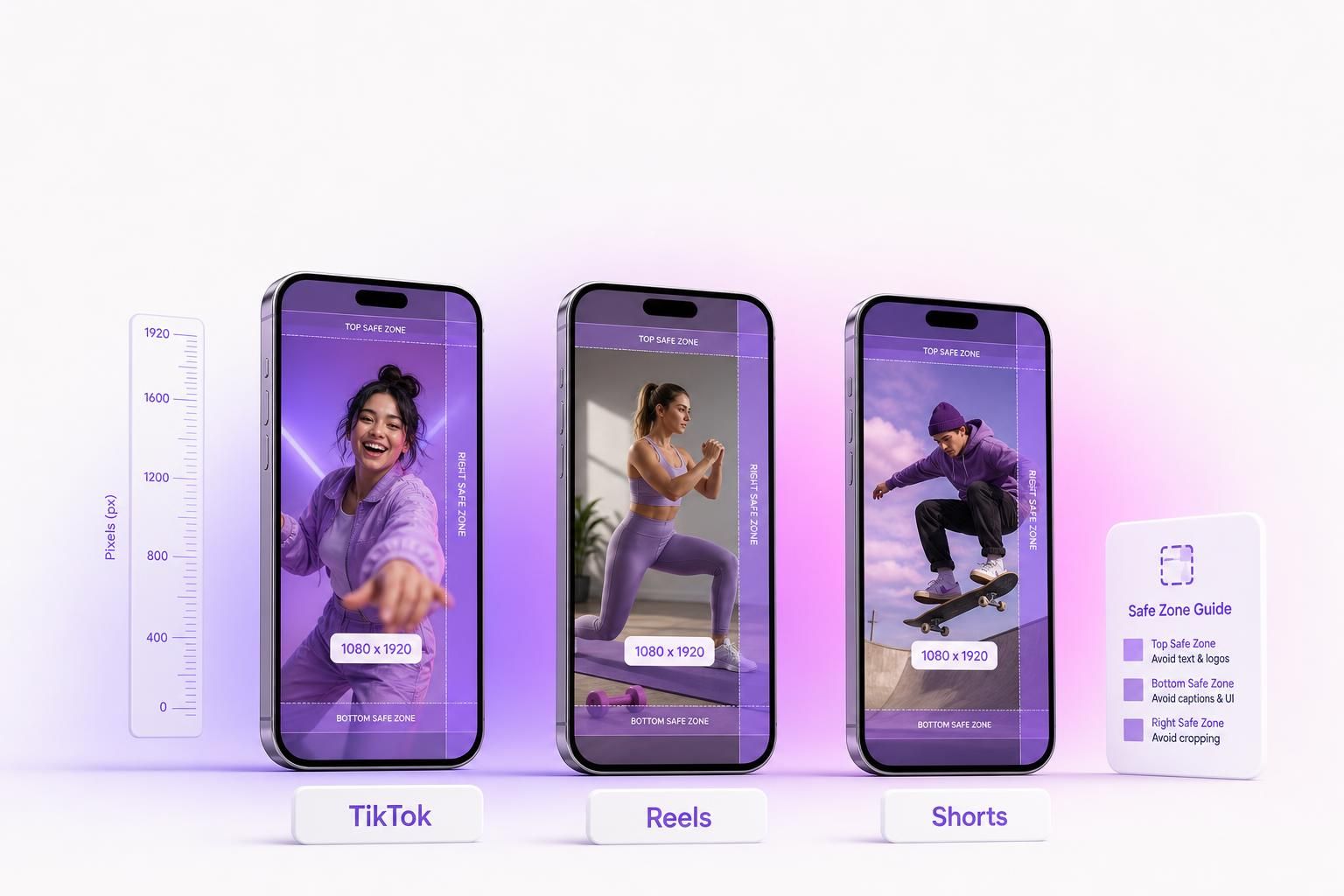
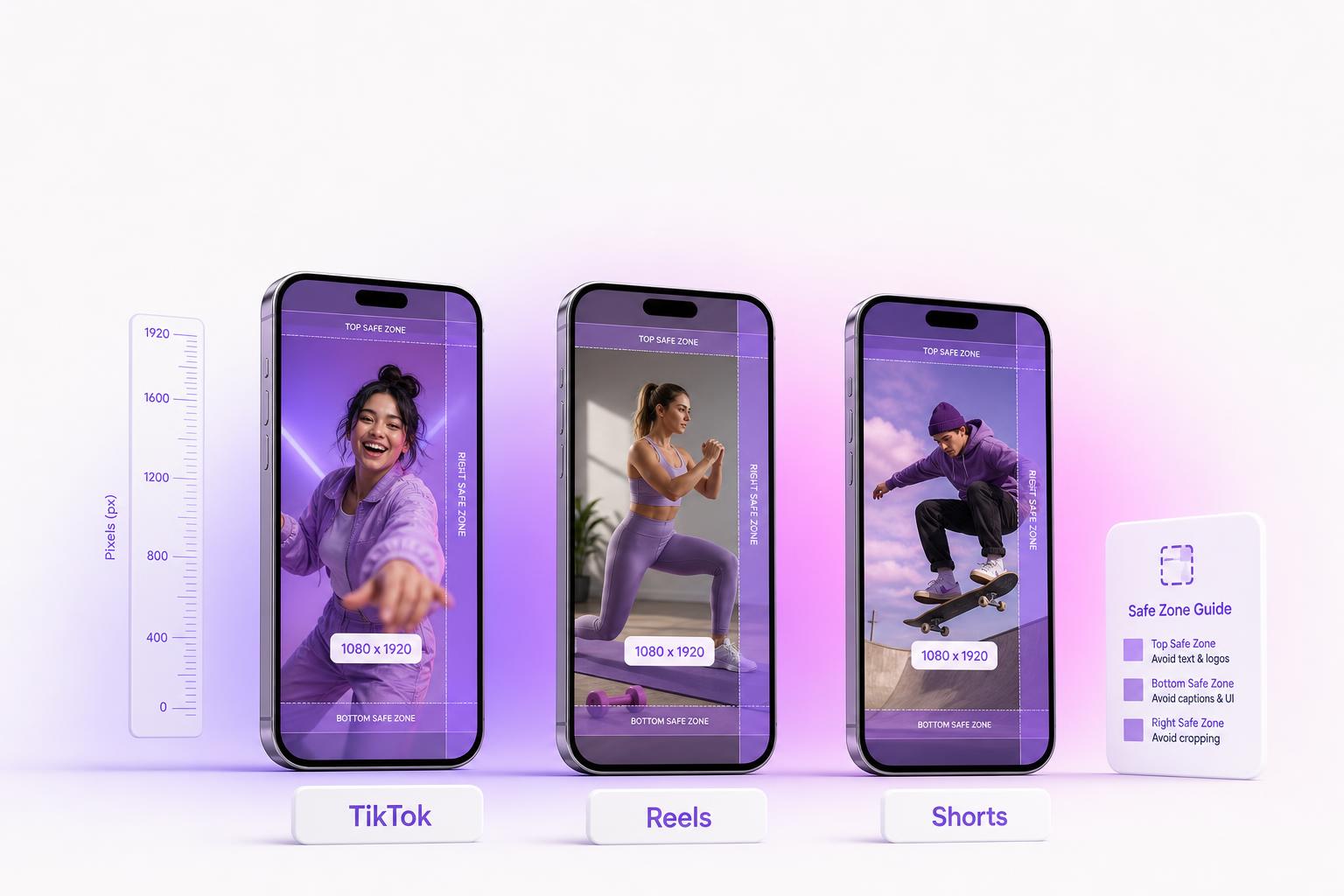
TikTok, Instagram Reels, and YouTube Shorts all want the same master file: 1080x1920 pixels at 9:16. The part that actually decides whether your text gets covered, your video gets letterboxed, or your CTA gets cropped is the safe zones and the per-platform quirks. Reels secretly crops your 9:16 to 4:5 in the feed. Shorts has the biggest bottom UI of the three. TikTok's engagement sweet spot has compressed to 15-30s even as its upload cap ballooned to 60 minutes. This is the full 2026 reference.
The bottom line: Master at 1080x1920, 9:16, H.264 + AAC, with a high upload bitrate (8-15 Mbps) so the platform re-encode does not shred it. Keep every word and logo inside roughly the center 856x1094 if you publish one file everywhere, and export a clean watermark-free master so you can upload to each platform separately.
The Quick-Reference Spec Sheet
One master file covers all three platforms. The differences are in duration, file caps, and how each app crops and overlays. Here is every number side by side.
| Spec | TikTok | Instagram Reels | YouTube Shorts |
|---|---|---|---|
| Recommended resolution | 1080 x 1920 | 1080 x 1920 | 1080 x 1920 |
| Minimum resolution | 540 x 960 | 720 x 1280 | 720 x 1280 |
| Primary aspect ratio | 9:16 | 9:16 | 9:16 |
| Other ratios accepted | 1:1, 16:9 (letterboxed) | 1:1 (cropped). Note: 4:5 is how the feed crops your 9:16, not an upload target | 1:1 (letterboxed) |
| Max duration | 10 min in-app, up to 60 min upload (pro/select, rolling out) | 15 min upload cap (20-min in-camera rolling out) | 3 minutes (180s) |
| Algorithm sweet spot | 15-30 sec | under 3 min | 15-60 sec |
| Max file size | 287.6 MB iOS, 72 MB Android, 500 MB web | 4 GB (keep under 500 MB) | 256 GB (keep under 500 MB) |
| Container formats | MP4 (best), MOV | MP4, MOV | MP4, MOV, WebM |
| Video codec | H.264 (H.265 ok, less compatible) | H.264 | H.264 |
| Audio codec | AAC | AAC | AAC-LC, 48 kHz |
| Frame rate | 23-60 fps (30 standard) | 30-60 fps | 24/25/30/48/50/60 fps |
| Target bitrate | 8-15 Mbps | 3.5-10 Mbps | 8-12 Mbps |
| Cover / thumbnail | 1080 x 1920 (grid: center 1080 x 1080) | 1080 x 1920 (grid now 4:5, 1080 x 1350) | 1280 x 720 standard; 1080 x 1920 Shorts poster |
Sources: YouTube recommended encoder settings, YouTube 3-minute Shorts, PetaPixel 20-minute Reels. Safe-zone pixel values further down are reverse-engineered from the current app UIs and are approximate.
How we sourced this:
Resolution, codec, duration, and file-size numbers come from each platform's published encoder docs and help center pages. The safe-zone pixel values are reverse-engineered by measuring the current in-app UI overlays at 1080x1920, so treat them as well-calibrated approximations rather than published constants. The UIs shift; check your live preview before a big launch.
Start With One Master File: 1080x1920, 9:16
All three platforms render 9:16 full-bleed and downscale everything else. So the move is to author one high-quality master at 1080x1920 and treat it as the source of truth. Export it H.264 in an MP4 container with AAC audio, 30 fps (or 60 if your footage is genuinely high motion), and a generous bitrate so the platform re-encode has clean source to work from.
Minimum resolution is the floor, not the target. TikTok will accept 540x960 and Reels and Shorts will accept 720x1280, but anything below 1080x1920 looks visibly soft on a modern OLED phone. 1080x1920 is the floor, not the ceiling: you raise quality above that through bitrate, not by adding pixels. Push 8-15 Mbps on the upload master.
Safe Zones: Where Each App's UI Eats Your Creative
The single biggest cause of ruined vertical creative is putting words or logos where the app paints its own buttons. Every platform overlays a top bar, a bottom caption tray, and a right-side engagement column on top of your full-bleed video. The exact margins differ, and Shorts has the most aggressive bottom UI of the three. Here is one 9:16 frame with the bands labeled, then the precise per-platform overlays. To see the bands on your own file, the free TikTok, Reels and Shorts safe zone overlays draw each platform's official numbers over your creative at true scale and download as transparent PNGs.
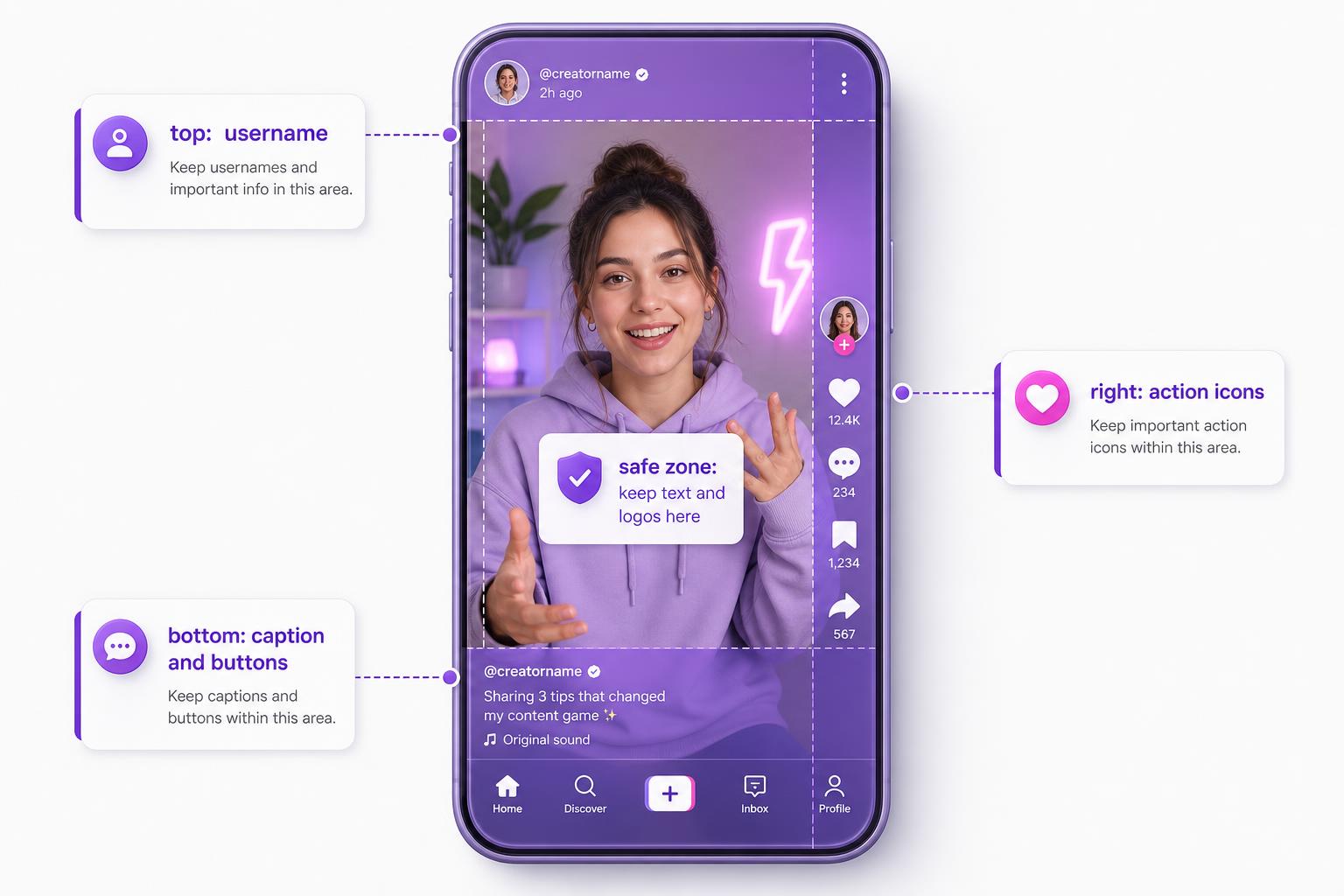
The violet bands below are the top and bottom UI overlays. The fuchsia band on the right is the like / comment / share / save column. The white center box is the usable area where your headline, product, and CTA are guaranteed to stay visible. These numbers are on a 1080x1920 canvas.
TikTok Safe Zone
TikTok puts the username and follow button up top, the caption, sound attribution, and action row along the bottom, and the engagement icons down the right edge. On ads, the bottom grows further to fit the CTA button. The usable center lands around 886x1432.
~886 x 1432
TikTok
Top 120-200px · Bottom 250-370px · Right 120-164px · Left 50-60px (on a 1080x1920 canvas)
Instagram Reels Safe Zone
Reels has the trickiest situation because there are two crops to plan for. In the Reels player the overlay margins are roughly the ones below, leaving a player safe center near 929x1325. But in the main feed, a 9:16 Reel is cropped to a 4:5 (1080x1350) center slice, and the profile grid thumbnail is now 4:5. So even if you nail the player safe zone, the feed preview can chop the top and bottom ~285px. Keep your key text and logos inside the center 1080x1350.
player ~929 x 1325
Instagram Reels
Top 108-250px · Bottom 320-420px · Right 35-120px · Left 50-60px (on a 1080x1920 canvas)
The Reels feed crop is the one that gets people
You can design a perfect 9:16 Reel, see it look great in the player, and still have the top and bottom of your hook clipped in the home feed because the feed shows a 4:5 (1080x1350) center crop. If your opening line or logo lives in the top or bottom ~285px, it vanishes for everyone scrolling the feed. Anchor anything load-bearing to the center 1080x1350.
YouTube Shorts Safe Zone
Shorts has the largest bottom UI of the three. The title, channel name, subscribe button, and description all stack along the bottom and can eat 420-576px. That is roughly a quarter to a third of the frame. Put any CTA at least ~400px above the bottom edge so it never disappears behind the description tray.
keep CTAs ~400px up
YouTube Shorts
Top 150-225px · Bottom 420-576px · Right 120-150px · Left 40px (on a 1080x1920 canvas)
| Margin | TikTok | Reels | Shorts |
|---|---|---|---|
| Top | ~120-200px | ~108-250px | ~150-225px |
| Bottom | ~250-370px | ~320-420px | ~420-576px |
| Right | ~120-164px | ~35-120px | ~120-150px |
| Left | ~50-60px | ~50-60px | ~40px |
The universal safe area (one file everywhere):
If you ship a single creative to all three platforms, avoid the top 250px, bottom 576px, right 164px, and left 60px. That leaves roughly a center 856x1094 zone where you are safe on TikTok, Reels, and Shorts at the same time. Design your hook, product, and CTA inside that box and nothing important ever lands under a button.
Knowing the spec is half of it. You still have to ship a correctly-sized file.
Already have a square or landscape ad that converts? Drop it into the free Meta Ad Resizer to snap it to a clean full-bleed 9:16 (or 4:5 / 1:1) without letterbox bars or stretching. Need brand-new vertical creative? The AI ad generator outputs at 1080x1920 natively, and the UGC video generator makes vertical video ads built for TikTok, Reels, and Shorts.
Aspect Ratio: Full-Bleed 9:16 vs Letterboxed Squares
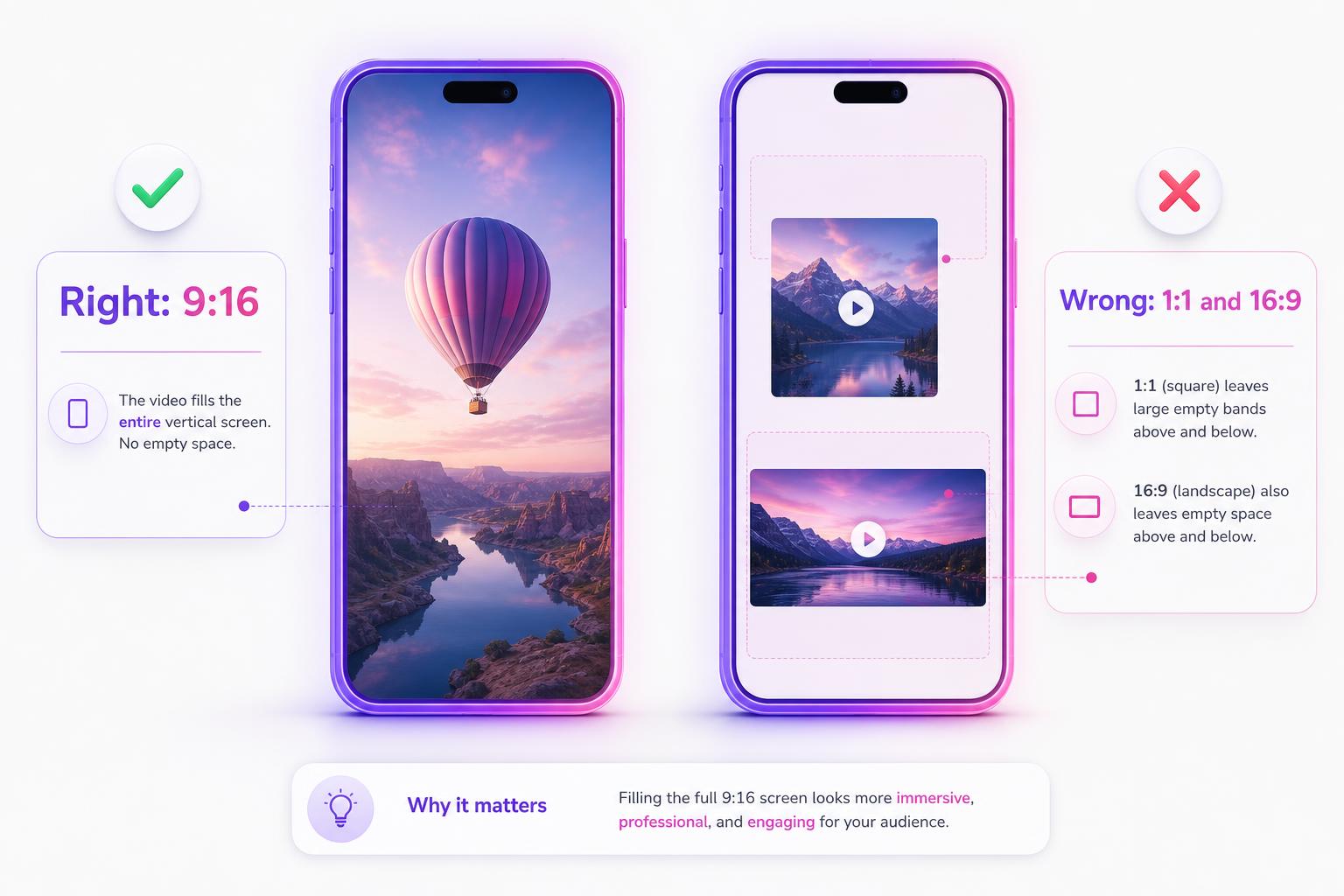
A 1:1 square or 16:9 landscape file on TikTok or Shorts gets letterboxed with black bars, wastes 30-50% of the screen, and gets deprioritized because the platforms reward native full-bleed 9:16. Render or reframe to 9:16 before you upload, never after.
The Common Mistakes (And How to Avoid Them)
Wrong ratio gets letterboxed
A 1:1 or 16:9 file on TikTok or Shorts shows black bars and gets deprioritized. Export native 9:16, not a square you hope fills the screen.
A correct Reel still crops in the feed
A perfectly framed 9:16 Reel is shown as a 4:5 center crop in the home feed, so the top and bottom ~285px can be cut. Keep the hook centered.
Text hidden behind the UI
Shorts is the worst offender because of its huge bottom tray. Captions and CTAs that sit in the bottom 576px disappear. Lift them ~400px up.
Treating 1080x1920 as the ceiling
It is the floor. Upload a high-bitrate (8-15 Mbps) master so the platform re-encode has clean source. Low bitrate ships muddy on OLED.
Cross-platform re-uploading
Downloading from one app and reposting to another stacks lossy compression, and platforms suppress rival watermarks (a TikTok watermark gets buried by IG and YouTube). Export a clean master and upload to each separately.
Minimum res is not recommended res
540x960 will upload, but it looks soft. The minimum exists for bandwidth, not for quality. Always master at 1080x1920.
What Changed in 2025-2026
Most of the recent shifts are around duration. The headline changes:
YouTube Shorts max length went 60s to 3 min. Rolled out October 15, 2024 and reached all users January 9, 2025 (source: YouTube Help).
Instagram Reels feed-eligible length moved from 90s toward 3 min, while the hard upload cap rose to 15 min (20-min in-camera recording rolling out from November 2025; source: PetaPixel).
The Instagram profile grid shifted 1:1 to 4:5 (now 1080 x 1350) during 2025, which changes how your cover frame gets cropped on your profile.
TikTok added 60-minute uploads for select and pro accounts (rolling out), well beyond the old short-form cap.
YouTube Shorts over 60s with a Content ID claim are blocked globally. If your clip is longer than a minute and trips a copyright match, it will not publish anywhere.
Frequently Asked Questions
What size is a TikTok, Reel, or Short?
All three use 1080x1920 pixels at a 9:16 aspect ratio as the recommended resolution. That single master file works full-bleed on every platform. Master at 1080x1920 and never below it.
How long can each platform's video be?
YouTube Shorts caps at 3 minutes. Instagram Reels allows up to 15 minutes on upload (20-minute in-camera recording rolling out), but the algorithm favors under 3 minutes. TikTok allows 10 minutes in-app and up to 60 minutes on upload for select accounts. The sweet spots are much shorter: 15-30 sec on TikTok, 15-60 sec on Shorts, under 3 min on Reels.
Why does my video have black bars?
You uploaded a 1:1 square or 16:9 landscape file instead of 9:16. TikTok and Shorts letterbox anything that is not full-height vertical, and they deprioritize letterboxed clips. Re-render at 1080x1920 before uploading, or reframe an existing asset to 9:16.
Where do I keep text so the UI does not cover it?
For one file everywhere, stay inside the center 856x1094 of the 1080x1920 canvas (avoid the top 250px, bottom 576px, right 164px, left 60px). Shorts has the largest bottom UI, so keep CTAs at least ~400px above the bottom edge. These are reverse-engineered approximations; check your live preview before launch.
Can I post the same video to all three?
Yes, from one master file, but do not download from one app to re-upload to another. That stacks lossy compression and the platforms suppress rival watermarks. Export a clean watermark-free master and upload it separately to each platform.
Ship Vertical Creative at the Right Spec, First Try
Generate 9:16 ads natively at 1080x1920, or snap an existing asset to full-bleed vertical with the free Meta Ad Resizer. No letterbox bars, no guessing the safe zone. Free credits, no card.
Free credits included. Generate vertical ads in ~30 seconds.
Related Resources
Instagram Story Dimensions 2026
The full 9:16 Story spec sheet, safe zones, and the 4:5 trap that wastes screen space.
Facebook Video Ad Sizes 2026
Resolution, length, bitrate, and codec specs for every Facebook video ad placement.
Facebook Ad Image Sizes 2026
The full image spec sheet for every Facebook placement.
Facebook Ads Library Search
See what vertical creative your competitors are actually running right now.
Make your next ad from what already runs
Research what competitors are running, then generate your own on-brand ads in minutes.