AI Product Photography: What Works, What Doesn't, and How to Get Started
A practical guide to AI product photography for ecommerce. Learn which products AI handles well, real cost savings vs traditional photography, platform policies, and common pitfalls to avoid.
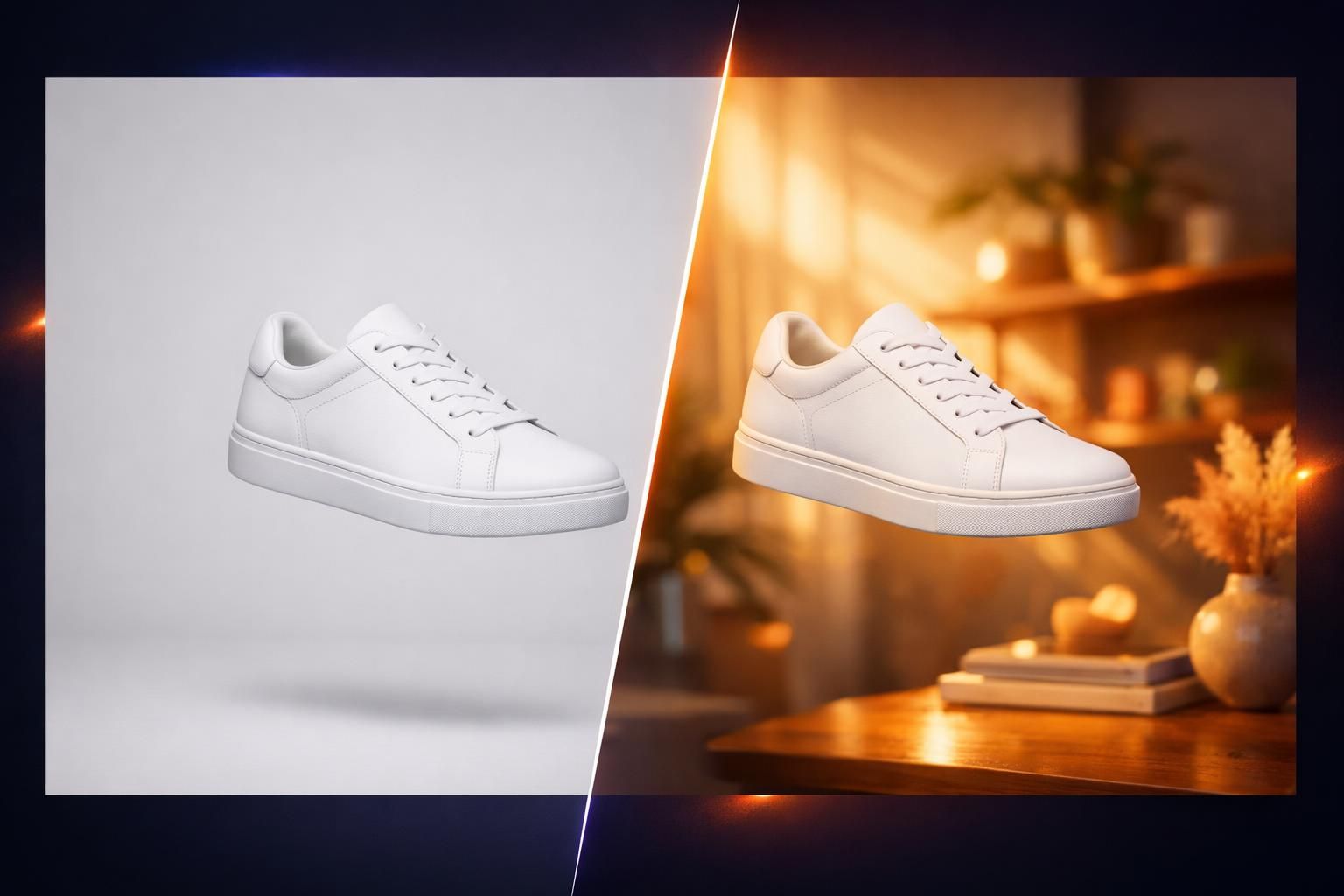
Traditional product photography costs $50 to $150+ per image. AI can do it for a few dollars. But before you cancel that photographer, you need to know where AI product photography actually delivers--and where it falls flat. This guide covers the real state of AI product photos in 2026, with no hype and no sugarcoating.
The Quick Version: AI product photography is genuinely useful for many ecommerce sellers--especially for background swaps, lifestyle scenes, and catalog variations. It can cut costs by 90% and save days of production time. But it still struggles with reflective surfaces, fine detail, and dimensional accuracy. The best approach for most sellers is a hybrid: real hero shots plus AI-generated variations.
Why Product Photos Make or Break Your Sales
Before we get into the AI stuff, let's talk about why product photography matters so much in the first place. The numbers are staggering.
93% of online consumers say visual appearance is the key deciding factor in a purchase. On Etsy specifically, 90% of shoppers rank photo quality as "extremely important" or "very important" to their buying decision--making it the single most influential factor, above price, reviews, and shipping cost.
The business impact is just as clear. Products with high-resolution photos see 94% higher conversion rates than those with low-resolution images. Having multiple product images can double conversions, and 60% of shoppers want to see at least 3-4 images before buying.
And here is the kicker: 22% of product returns happen because the item looked different in person. Bad photos don't just lose sales--they create expensive returns.
The Bottom Line:
Photo quality is not optional for ecommerce. It directly impacts clicks, conversions, and returns. The question is how to get great photos without spending a fortune--and that is where AI comes in.
How AI Product Photography Actually Works
AI product photography is not one thing. It is a set of tools that handle different parts of the product photo pipeline. Here is what most AI tools actually do under the hood:
The Core AI Capabilities:
- Background removal and replacement -- AI detects your product, strips the background, and places it on a clean white surface, marble counter, wooden table, or any scene you describe.
- Scene generation -- Describe a setting (e.g., "modern kitchen with morning light") and AI generates a photorealistic environment around your product.
- Lighting and shadow correction -- AI adjusts lighting to match the new scene, adding realistic shadows and reflections so the product looks naturally placed.
- Variation generation -- Upload one product photo and generate dozens of variations with different backgrounds, angles, and styling--all in minutes.
- Enhancement and upscaling -- Improve sharpness, correct white balance, and boost resolution of existing product images.
The key thing to understand: AI works best when you give it a decent starting photo. You still need to photograph your actual product--even a basic smartphone shot on a clean surface. The AI handles the heavy lifting of making it look professional.
Where AI Product Photography Works Well
AI is not equally good at everything. Some product categories and use cases are dramatically better suited for AI than others. Here is a realistic breakdown:
AI Excels At These Tasks:
- White background product shots -- The bread and butter of ecommerce photography. AI handles this extremely well for most product types.
- Lifestyle scene placement -- Your candle on a cozy bedside table. Your protein powder in a gym setting. AI generates these convincingly.
- Seasonal and thematic variations -- Need holiday versions of your product shots? Valentine's Day styling? Summer vibes? AI can generate these in minutes instead of days.
- A/B testing different presentations -- Generate 10 different background variations and test which converts best, without 10 separate photoshoots.
- Catalog expansion -- When you have 200 SKUs that each need 5+ photos, AI makes the economics actually work for small sellers.
A BigCommerce study analyzing 12,000 online stores found that merchants who implemented AI-enhanced product photography saw conversion rate improvements between 35% and 67%, with a median increase of 49%. That is not theoretical--those are real stores with real sales data.
Where AI Product Photography Still Falls Short
Here is where honesty matters. AI product photography has real limitations, and ignoring them will cost you money and credibility.
Known Problem Areas:
- Reflective and transparent surfaces -- Jewelry, glassware, chrome products, and anything with a mirror-like finish. AI struggles to accurately render how light bounces off and passes through these materials. The subtle gleam of a gold necklace or the refraction in a crystal vase requires real photography.
- Product distortion -- AI does not truly understand 3D dimensions. It may subtly warp product shapes, stretch proportions, or get curves wrong. For a t-shirt on a flat lay, this is rarely noticeable. For a precision watch face, it is a dealbreaker.
- Fine text and labels -- If your product has detailed text on it--ingredient labels, brand names in small print, serial numbers--AI often garbles or distorts these. Always check AI output carefully for text accuracy.
- Consistency across a catalog -- While individual AI images can look great, maintaining perfectly consistent lighting, color temperature, and styling across hundreds of images can be challenging. Real studios offer more predictable consistency.
- Complex product interactions -- Products being worn, held, or used by a person. AI-generated models still look off in many cases, especially hands interacting with products.
- Brand compliance -- If your brand has strict guidelines for exact Pantone colors, specific shadow angles, or precise product placement, AI output can drift from these standards.
Honesty Check:
If you sell handmade jewelry, fine art, luxury watches, or crystal glassware, AI should supplement your photography--not replace it. These products sell on tactile beauty and craftsmanship details that AI cannot yet faithfully reproduce.
The Real Cost Comparison
This is where AI product photography makes the strongest case. The cost difference is not incremental--it is an order of magnitude.
| Expense | Traditional | AI-Assisted |
|---|---|---|
| Photographer (day rate) | $1,000-$2,000 | $0 |
| Studio rental (half day) | $500-$1,500 | $0 |
| Props and styling | $200-$500 | $0 (AI-generated) |
| Post-production editing | $15-$50/image | Included |
| Cost per final image | $50-$150+ | $2-$15 |
| Turnaround time | 1-3 weeks | Minutes |
| 50-product catalog | $2,500-$7,500+ | $100-$750 |
For a small Etsy seller with 50 products, the difference between $5,000 and $300 for a full catalog of professional-looking images is the difference between "I can't afford good photos" and "every product looks great." That is transformative.
But cost is only part of the equation. Speed matters too. Traditional photography requires scheduling, shipping products, shooting, and editing--often taking 1-3 weeks. AI generates images in seconds. When you launch a new product or need to test different presentations, that speed gap is enormous.
Create Professional Product Ads in Minutes
AdMakeAI helps you generate product ad images with AI backgrounds, lifestyle scenes, and professional styling. Upload your product, describe your scene, and get results in seconds.
Is AI Product Photography Allowed on Marketplaces?
One of the most common concerns sellers have: will I get banned for using AI-generated product photos? The short answer is no--but there are nuances.
The Key Rule Across All Platforms:
Every major marketplace allows AI-enhanced product photography as long as the images accurately represent the product the customer will receive. The enforcement focus is on accuracy, not on how the photo was created.
- Amazon actively encourages sellers to use AI tools for product imagery. Their main image must have a pure white background (which AI handles perfectly). Secondary images can be lifestyle shots. Just don't make the product look different from what ships.
- Etsy treats AI photography tools the same as Photoshop. If you hand-throw a ceramic bowl and use AI to swap the background from your kitchen to a white studio, that is fine. Their concern is whether the product itself is handmade, not how you photograph it.
- Shopify is your own store--you set the rules. But misleading imagery erodes customer trust and drives returns. Be honest about what the customer is getting.
The Golden Rule:
Use AI to make your product look its best in a professional setting. Do not use AI to make your product look like something it is not. A background swap is fine. Making your $20 sunglasses look like $500 designer frames is not.
5 Common Mistakes with AI Product Photos
After seeing thousands of AI-generated product images, these are the pitfalls that trip up sellers most often:
1. Using a bad source photo
AI can improve your photo, but it cannot invent details that are not there. A blurry, poorly-lit smartphone photo produces blurry, poorly-lit AI output. Take the best source photo you can--clean background, decent lighting, sharp focus. Even a well-lit iPhone photo on a white sheet works.
2. Not checking for product distortion
AI may subtly alter your product's shape, proportions, or colors. Always compare the AI output against the real product. Pay special attention to straight edges, symmetry, and text on packaging. If something looks "off," your customers will notice too.
3. Over-generating without quality control
Just because you can generate 50 variations does not mean you should publish all 50. AI output is inconsistent--one image might look flawless while the next has weird shadows or floating objects. Curate ruthlessly. Generate many, publish few.
4. Ignoring scene realism
A tiny kitchen gadget sitting on a massive marble island with dramatic sunset lighting looks fake, not professional. Match the scene to the product's actual context. Think about where a customer would actually use your product, and set the scene accordingly.
5. Relying solely on AI for every product
Not every product should get the AI treatment. If you sell handmade ceramics, part of the appeal is the craftsmanship and imperfection. Real photos capture that. Use AI for the catalog shots and the background swaps, but keep the hero shots real when authenticity is the selling point.
When You Should Still Hire a Photographer
AI is a tool, not a total replacement. There are situations where a professional photographer is still the right call:
Invest in a Photographer When:
- Launching a new flagship product
- Creating brand campaign imagery
- Shooting jewelry, luxury goods, or glassware
- You need model photography (on-body shots)
- Creating packaging or print materials
- Your product has complex textures or reflections
Use AI When:
- Building out your full catalog
- Creating background and scene variations
- A/B testing different presentations
- Seasonal or promotional image updates
- Social media content at scale
- Budget is a primary constraint
The smartest approach for most ecommerce sellers in 2026 is a hybrid. Invest in one professional shoot to get your core hero images right, then use AI to generate the dozens of variations, lifestyle shots, and platform-specific versions you need. You get the best of both worlds: authenticity where it matters and scalability where it counts.
How to Get Started: A Practical Step-by-Step
If you are ready to try AI product photography, here is a simple process that works regardless of which tool you use:
- Shoot your source photos right. Find a well-lit spot (near a window works great). Use a clean, simple background--a white poster board or sheet is perfect. Take multiple angles. Use your phone's highest resolution setting. Stability matters, so prop your phone against something or use a cheap tripod.
- Start with background replacement. This is the lowest-risk, highest-impact AI use case. Upload your product photo and swap the background to clean white, then to a lifestyle scene. Compare against your original and check for distortion.
- Generate variations for testing. Once you have one good AI image, create 3-5 variations with different backgrounds and scenes. Use these for A/B testing on your listings. Tools like AdMakeAI's ad generator let you describe your ideal scene and generate results in seconds.
- Quality check everything. Compare every AI image against your real product. Check text legibility, color accuracy, proportions, and shadow direction. Would you trust this image enough to buy the product? If not, regenerate or use a different approach.
- Test and measure. Upload both AI and traditional photos to your listings and track performance. Pay attention to click-through rate, conversion rate, and return rate. The data will tell you what works for your specific products.
Pro Tip for Etsy Sellers:
Etsy ranks listings partly on engagement and conversion. Better photos mean more clicks, which means better search ranking, which means more sales. Investing in AI product photos can create a positive flywheel for your shop's visibility.
The State of AI Product Photography in 2026
The technology is improving fast. Two years ago, AI product photos were mostly a novelty--fine for social media but not good enough for marketplace listings. Today, for many product categories, AI output is genuinely indistinguishable from professional studio photography.
The trajectory is clear: AI is getting better at handling reflective surfaces, maintaining product accuracy, and generating consistent catalog imagery. It is not replacing professional photography entirely, but it is making professional-quality imagery accessible to sellers who could never afford it before.
For a small seller on Etsy or Shopify, that is the real story. AI product photography is not about cutting corners. It is about leveling the playing field. Your handmade candle shop can now have product imagery that looks as polished as a major brand--at a fraction of the cost and a fraction of the time. That is a genuine competitive advantage, and it is available right now.
Ready to Try AI Product Photography?
Create professional product ad images with AI backgrounds, lifestyle scenes, and studio-quality styling. Upload your product and see results in seconds.
Free credits included -- No credit card required
Related Resources
AI Ad Generator
Create product ads with AI-generated backgrounds and scenes
Create Facebook Ad Tool
Create an ad from the style of a winning product ad for your own brand
Why Ugly Ads Outperform Polished
When authentic beats perfect -- and how to use it for your brand
Creative Fatigue Guide
Why your winning ads die after 2 weeks and how to revive them
Ready to create winning ads?
Research what competitors are running, then generate your own on-brand ads in minutes.